Search the Community
Showing results for tags 'gps'.
Found 4 results
-
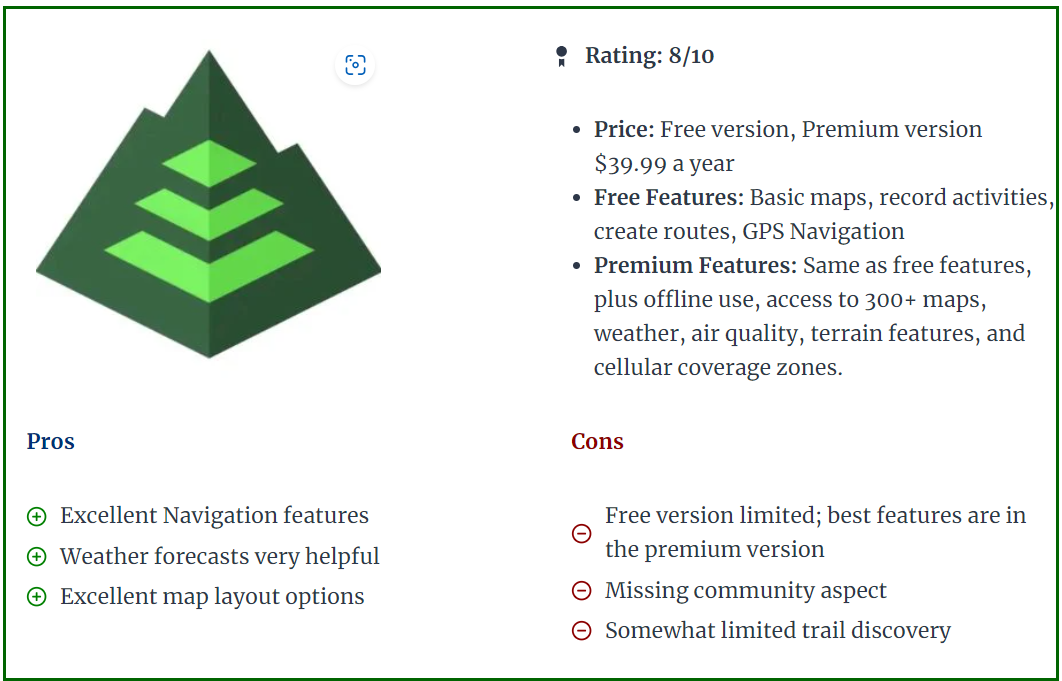
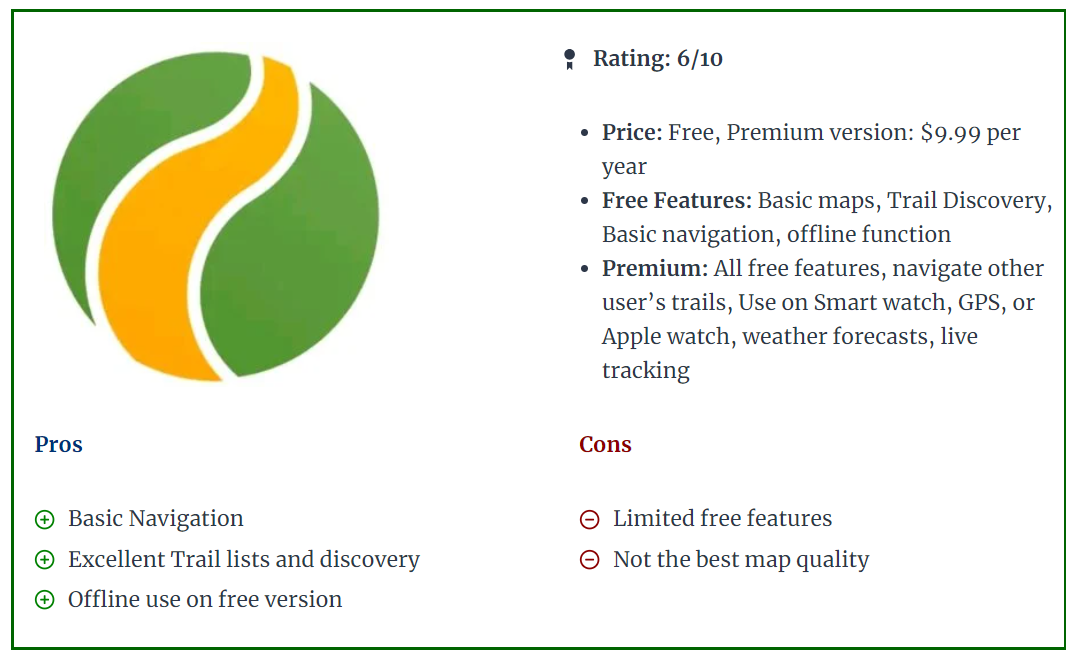
 Finding our way in the desert probably was never easier than it is today. All of us have a phone with GPS signal and with a simple click on Google Maps we can see where we exactly are in the desert. In below topic we will compare some of the most known GPS applications and devices. Of course there are probably hundreds of apps on the market, but we will focus on the apps often used by off-roaders and particularly in this part of the world (Middle East). It is important to divide GPS apps into different uses, based on the type of off-roader you are. 1. Record the track you have done with the club. Can be done with most GPS apps free of cost (GaiaGPS, Gurumaps, Alltrails, etc..). In the free apps you might be restricted to Topo maps only, not satellite imagery. Offline download of the maps will not be possible. 2. Find tracks uploaded by others and follow them. Once you have some off-road experience and you recorded some tracks, it might be interesting to find trails that others have posted or uploaded. The community approach of Wikiloc, Trailforks, or Alltrails is perfect for this. 3. Create your own maps, routes. This part is more for people who lead drives or want to create their own overlanding routes. It will be important to have access to good map layers like satellite imagery or topographic maps, or POI (points of interest) so you can trace a route of where you are planning to go. This kind of planning will need to be done on a laptop or computer. You can use Caltopo, GaiaGPS, or even Basecamp. Advantage of Basecamp is it's a standalone windows program that does not need an internet connection. Disadvantage is the limited amount of maps you can use (satellite imagery only possible if you have a Garmin device with Birdview license). I personally prefer Caltopo as my planning program and then export to my mobile app. Google Maps (Phone and Website) While Google Maps is good for basic use, it lacks recording possibilities, so it does not provide an option to record your tracks and re-visit them for later use. You can add some waypoints and save them in the application, but as most of this requires a data or wifi connection to work properly, Google Maps is not ideal for navigating in the desert. It allows for downloading some offline maps, but even this is a temporary function (30 days from what i could remember). The positive points of Google Maps are the fantastic satellite imagery, and the POI (points of interest) which allows you to find nearby gas stations, lodging, etc.. and also provides the well-known turn-to-turn guidance. I think most of us use Google Maps or Waze for daily navigation in the city and we cannot miss it anymore. Garmin GPS devices (standalone - Desktop Functionality through Garmin BaseCamp. Even before Google Maps arrived, Garmin was the king of GPS and navigation devices but has lost lots of market share with the advent of phones and apps. For that reason, they jumped into the world of fitness apps and smart fitness watches. Devices like the Garmin 276C, launched in 2004, are legendary for all kinds of offroad navigation (marine, aviation, 4x4), allowing overlanders to store thousands of tracks and waypoints, and the 276C was known for being big but super reliable. In 2016 Garmin relaunched a facelift model called the 276cx, but in the meantime there were other models like the Montana series, or the Overlander model that offered similar features but now included touch screen features, while the 276cx remained a push button model. Of course it depends on the type of use, as bikers and boats might prefer the simple push buttons over a touch screen that will act up when it gets wet. The main advantages of dedicated GPS devices like Garmin are the screen quality (much less glare), reliability, and in most cases also accuracy is slightly better than a phone. Furthermore, it allows you to keep your phone for other purposes like preserving your battery in case you need to take calls. Their devices can take a serious beating, are often waterproof, and remain the preferred choice for hikers and adventurers that don't want to rely on a flimsy phone. The Garmin devices are also still popular with people who go overlanding across different countries, as all the maps are stored in the memory so there is no need for a data connection. Rather than buying the maps from Garmin, most people head over to Opentopomap or Openstreetmaps to download free and regularly updated Topo and DEM maps. (Digital Elevation Terrain Model - offering shaded relief). Tip: The Shaded Relief layer functionality is brilliant to find the bigger dunes and bowls They also offer satellite imagery by means of the Birdview satellite Subscription which used to be quite expensive, but seems to be released now as a free option. At least on my devices it shows as "valid until 2038". Birdview is not as crisp as Google Maps but is definitely not bad. The main disadvantage is the user interfacing and complexity of use. Garmin devices mostly have an older classic style of user interface (except for maybe the overlander model), while apps on phones became much easier to use. Secondly, Garmin really struggles to club together the different devices over the years into a centralized platform. Sure, you can connect your device with a cable to Garmin Basecamp on your laptop and this works fine, but wireless transfer of a GPX track to your phone works via the apps Garmin Explore or Garmin Connect, depending on which model. And on some older models like the 276cx you can use the Connect app, but you cannot export the track to GPX into your phone. All of this is for novice users a steep learning curve, and on top of that the devices are not cheap. If you like to venture into different countries and you want to have a dedicated device that contains all your maps and waypoints, then Garmin could still be a good fit. But as you will see further below in the phone apps, there are similar options. (keeping a dedicated phone that has an app with offline maps downloaded onto them). Garmin Basecamp desktop software, however old it is, remains a fantastic piece of kit for planning trips. What might be confusing to new users is the different ways of how Garmin considers tracks or routes or activities. Creating a route will put marker flags along the way so you cannot consider this is being an actual track. You can however convert a route into a track to overcome the limitations of a route. An activity is a recording that was made, like a hike, or an offroad drive. All in all Garmins is quite confusing in this aspect in comparison with the GPS apps. Gaia GPS (Phone and Website) GaiaGPS is an app that runs on your iphone or Android, and has been the market leader for offroad navigation via apps. There are plenty of Youtube videos that explains the functionality, and most of us in the club are using it. I found it by coincidence in 2019 and was then still using MotionX, that got discontinued eventually so if shifted entirely to GaiaGPS. Pros: - Fantastic amount and quality of built-in maps. For example, the one called "Sattelite with labels" which enables you to find trails (dotted lines). This alone has helped me tremendously to create routes for longer drives (scenic / overlanding). You can also add custom maps like Google Hybrid, Terrain, or Maps by having a look in my above post "Gaia GPS for beginners". - Great user interface, easy to learn. - Planning a route via the website works great, with snap-on routing that works flawlessly. - Offline download of your maps on your phone. - All tracks and waypoints are saved and synced across your devices and your account in the cloud. - You can enable a layer called "Public Tracks" which allows you to see tracks uploaded by other users. Great function to find new tracks ! Cons: - Number of updates over the last year has reduced the reliability. A few times i was automatically logged out of my account on my standalone phone without any reason. This is unacceptable when being somewhere in a remote place. - Syncing is sometimes slow and buggy. - Folder and organizing of tracks is not great. It's also quite slow to manage hundreds of tracks and thousands of waypoints via the website interface. A standalone desktop program would be fantastic and probably much faster. - Price has been steadily increasing over the years since Outside+ has taken over the ownership. - Route planning for draft or different projects is difficult. Sometimes i like to create a complete route with different waypoints where i don't want to keep this for later use. With GaiaGPS you are essentially always working within the same map (unlike Caltopo). Caltopo (Phone and Website) CalTopo - A Backcountry Mapping and Navigation Essential I found Caltopo as there has been a lot of discussion in the Gaiagps and Reddit forums of several users (hikers and offroaders) that moved over to Caltopo. I decided in 2022 to give it a try and it became my main app to plan routes (via the website). The main reason is that it allows you to work on different maps. So for example when i want to create an overlanding route through UAE, i can create a map called "UAE" and put all my routing and waypoint in there. I save it as a separate project and that way it does not clog up my other maps. Quite differently from Gaiagps but i really like this functionality. Secondly, the website works super fast ( no java-style like Gaia website), and it allows for quickly deleting tracks or waypoints without running through different web pages. I all looks a bit more dated but you get speed in return It also allows to create custom map layers, for example you can use the Google Sattelite image with a different layer. Currently i have a layer of ESRI sattelite footage with an overlay of Google Maps. It also offers a fantastic Shaded Relief layer, like described in Garmin above as well. The mobile app however is not yet where it should be in my opinion. It works less intuitively in comparison with GaiaGPS. Icons are smaller, and even though there are similarities, GaiaGPS offers a better user interfacing in general. The general consensus with many hikers and offroaders is that they use Caltopo website for planning their trips, and then import it in Gaiagps mobile app while on the hike/road. I do this as well quite often. There are different subscription levels, but most go for the Pro version which goes for around 50USD per year (similar cost to Gaiagps). If you are a plot surveyor or professional hiker, then the most premium (100USD per year) will offer you a standalone desktop version with more complicated custom functionalities. One disadvantage i found is that due to copyrights, the mobile app allows for offline maps downloading, but only a selected few maps can be actually downloaded. This is a bit of a turnoff if you are planning to use it often abroad when you have no data. You can however download the sattelite imagery, but this one lacks the "labels" which Gaiagps offers in their "Sattelite with labels". Guru Maps (Phone) Guru Maps - OpenStreetMap Wiki After testing so many apps, i personally find GuruMaps as good or even better than GaiaGPS. What i personally like most is the smooth flowing map when you are driving. While other apps have a kind of a stutter effect whenever the maps is shifting, Gurumaps doesn't have this issue. Unfortunately there is no website, so you will need to do your routeplanning on Caltopo or GaiaGPS and then export your route into Gurumaps. The interface is very user friendly and simple. Within minutes i found myself using the maps without having to scratch my head on where i could start recording or browse through my collection. The tracks you record can have a multicolor scheme based on speed or elevation. This is a very nice feature. For 22.5USD per year this works great for novice users. Disadvantage is the limitations in offline maps: it does not allow you to download imagery, only street and topo maps. This is a big disadvantage in my opinion, but probably explains the lower subscription cost. With Guru Maps Pro you can however import custom maps in MBtiles format. I've been experimenting with QGIS desktop software and now i am running GuruMaps with a Google Hybrid imagery offline downloaded layer! All Trails (Phone and Website) Alltrails is available for 36USD per year and offers a very user-friendly interface. It offers a view into nearby hikes or trails posted by others, so it has a bigger social functionality. I have not used the website and route creation function yet, but i think Alltrails is definitely a good option to consider using. It also allows for offline map downloading, and plenty of people in our club use it as well for the ease of use. To me, the website looks similar to Wikiloc, which allows you to find uploaded trails done by others. It does however not offer route-planning. Wikiloc (Phone and Website) The main focus of Wikiloc is finding trails posted by others (via the website), and by using the mobile app you can follow those same trails. Perfect for hiking. Outside+, the company that owns GaiaGPS offers something similar with Trailforks App. For off-roaders it can be used as well but lacks many functionalities. In my opinion it's a great platform to share your tracks on or download some interesting tracks that others have posted. That is the only functionality i am currently using it for. BackTrackMaps (Phone and Website) Backtrack: Maps for Backcountry Adventures. Very interesting desktop functionality when it comes to planning routes, and very similar to GaiaGPS. Also free to use for most of its functionality (30USD/YEAR for the PRO version) and even includes Mapbox Sattelite Imagery. Unfortunately, the mobile app only allows for "backtracking" your planned gpx routes, and does not allow recording your actual track. If this feature would be there, it would take a lot of Gaiagps customers away 2025 Update: Backtrackmaps has included Recording functionality.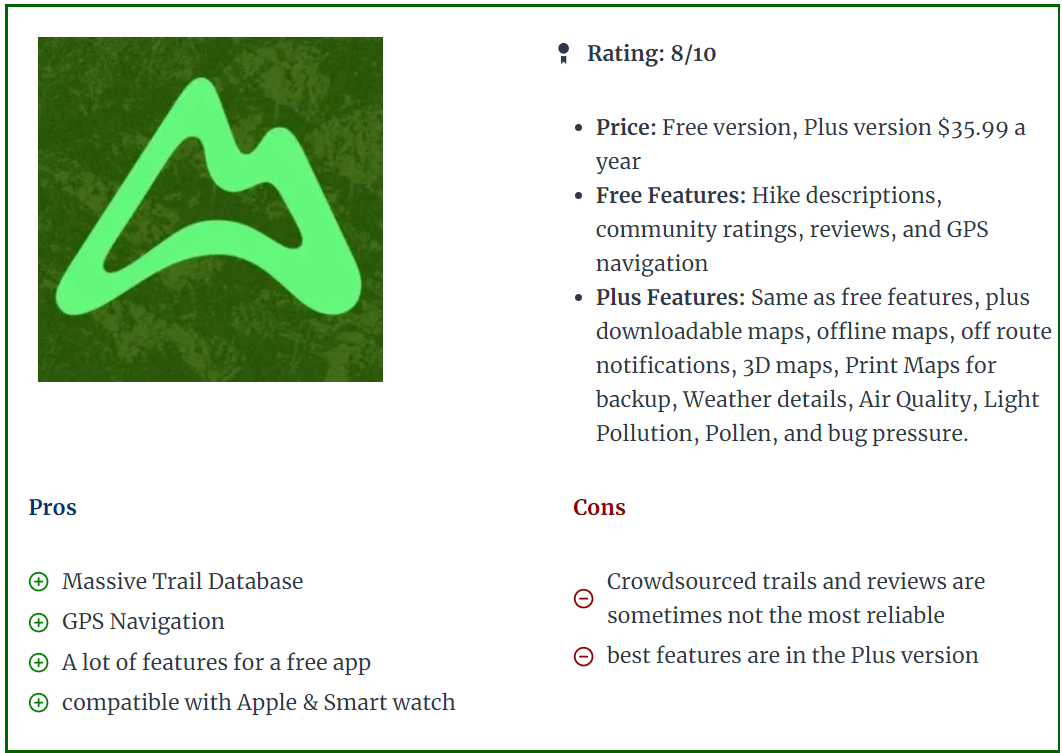

- 19 replies
-
- 12
-

-

-

-

-
in our search to have a decent GPS app to guide us in the desert, today i wanted to review and compare MotionX and Gaia GPS, which are both apps specifically tailored to Off-Road driving or hiking. As i had an old Samsung Note 5 laying around which had a very big screen, i decided to use that phone and mount it in my car to use it as a dedicated GPS. Unfortunately when i found out that MotionX is only for IOS platforms, i was forced to look for something else and stumbled upon Gaia GPS. In the Youtube tutorial below, this gentleman makes a great comparison and it's worth having a look at: As a summary, i come to the following: MotionX: + Completely Free with full functionality + Easy to use, set up - No Android support - No possibility to create multi-bend tracks Gaia GPS: + Easy to use and set up + Customizable Bar Tiles on the home screen + Overlay Maps + Possibility to create multi-bend tracks. - FREE version only has only 1 basic Topographic map, but the paid version costs 10USD per year that gives full functionality and satellite map. Full Premium Membership costs 30USD for year in case you want to add more maps and resources, but is more tailored to hiking. https://help.gaiagps.com/hc/en-us/articles/115003524547-Free-vs-Membership-vs-Premium-Membership Surely there will be more specific PROS and CONS once having used these programs. Please add them in your replies so we can share our hints and tricks to use these great apps. Both apps support map download, so you can download the area in case you have no data coverage in that area, or if your phone simply has no SIM card in it So there you have it, two apps which are perfectly capable of doing the things we want them to do for our Off-road adventures in the UAE deserts. Do share your questions, suggestions, experiences !
-
I am planning to restart the offroad activities now and wondering what is the best gps navigation for offroad you guys are using? I'm from Garmin era, that we used to stick on dash and record the route, way point and breadcrumb for the trail. Appreciate if anyone has any suggestion based on smartphone app (IOS / Android) so that's easier to use and share, only challenge will be the 3G/4G availability in remote areas, so may be an offline app.....? MUST READ: Best offroad GPS Navigation App for iPhone
- 17 replies
-
- 1
-
-
- gps
- gps navigation
- (and 1 more)
-
Hi I have an Acadia 2009 model with the built-in GPS. The maps are loaded by means of a CD which is frankly quite outdated. Would anyone happen to have a newer version of the GPS maps or a place where I can download the latest maps. Thanks