
Leaderboard


Popular Content
Showing content with the highest reputation on 11/03/2023 in all areas
-
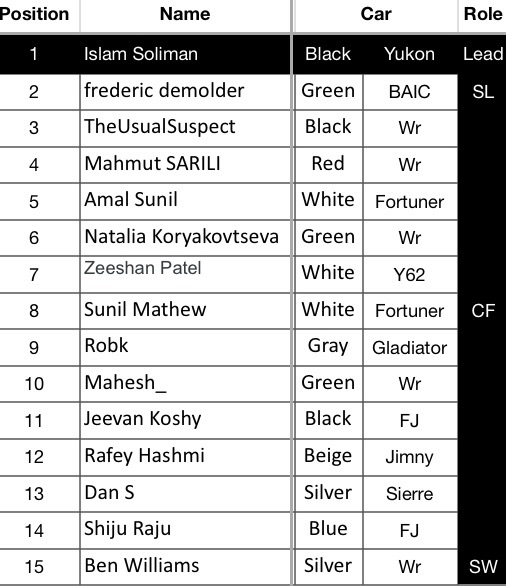
Time to wrap up our final prep for tomorrow... RSVP is now closed! Dear @Sunil Mathew @Rafey Hashmi @frederic demolder @TheUsualSuspect @Mahmut SARILI @Amal Sunil @Natalia Koryakovtseva @Zeeshan Patel @Robk @Mahesh_ @Jeevan Koshy @Dan S @Shiju Raju @Ben Williams .. see you all in the morning Below please find the key prep points so we are all ready for our early morning adventure: P.S. @Zeeshan Patel you have been added to the drive. Please confirm you will be there Pre-drive details below: Be ready at the meeting point by 6:30am (or before) with tires deflated (Front 14psi Rear 13psi) and flag erected Please ensure your programable radio is on, fully charged and set to Channel 3 (446,056) For first timers, pls ensure you complete the readings and video in the main drive post before the morning Briefing will be done on the sand before we start moving. Please ensure everything in the car is tied down and there are no moving objects Please check all car fluids, tow hooks, and ensure no hanging parts below the chassis. please ensure you come with a full tank (as much as possible) in addition to all necessary gear for this drive level specially your tire deflator, pressure gauge and a compressor, safety flag and radio. (NO FLAG or RADIO = NO DRIVE) MeetingPoint: https://maps.app.goo.gl/qohiNZfBEbD5pdAQ9 Convoy Order: Looking forward for meeting you all
 6 points
 -
Well I missed driving in a big convoy camaraderie and throwing banter at each other. Anyhow, competition is healthy but our love for desert driving transcends beyond clubs & DCT teams. Thus I'm gonna share Team Phoenix GPX files here with commentaries and videos. Even after 19th Nov, I will keep adding files here so that this becomes sort of a repository where advanced drivers can pick their flavor of the drives. Carnity Rules apply - safety first! Do not venture on your own even if you're Intermediate++ and do not lead if you have not led before. Here are the first 2: 1. Endurance Drive 6 hours: Sweihan to Al Saad (for refuelling in Adnoc), then continue towards Al Ain Airport (where the high dunes are). Levels: The Al Ain Airport section is Intermediate, switches required to get inside where the high dunes are located. The Sweihan to Al Saad part can be Fewbie Plus, with plenty of ridge-riding play areas. GPX File: https://drive.google.com/file/d/1Q7frV8f-iHCDypw5yxoFLEv9sfrcxqCf/view?usp=sharing Drive Recap video: https://www.instagram.com/reel/CzIvVnnJg83/ ReLive video: 2. Technical BackDoor to Nagra followed by Highway Express to exit. Levels: if you reverse and do the Highway Express first, it becomes a Newbie Plus drive with no obstacles. This is the track that people take to do picnics in Nagra. The Technical BackDoor is for Fewbie, full of dunes to cross whether straight-on or ride-then-slide (switch). The Nagra Climb is of course for 20+ Intermediate (need to have minimum 20 Intermediate drives because you have to make split-second decisions everytime you switch at the top). GPX File: https://drive.google.com/file/d/1k5FvDzYfZHi_N4zxvWPRO0zTHeF9QnBa/view?usp=sharing Drive Recap video: https://www.instagram.com/reel/Cy5P6SaJU9s/ ReLive Video: Enjoy your weekend drives!5 points
-
What a great signup ! @Gaurav@Srikumar@Looper@Gok Krish@Mohammad Sayawoush Azad@Krishna R@Senthil Kumar@Sreenath G@Ahmad Nerat@Premjit Vappala@AlexM@sohinik@Bjoern@Ignacio Quindós@Soufiane@Abhilash Kottakkal@Jaro Tuzinsky@Ben Williams@Bhaskar Some information prior to the event: 1. This is not an off-road drive, but a sit-down session to look and listen to the Pink Floyd - Dark Side Of The Moon album together. Bring your chairs, or a beach mat if you prefer to sit in the sand. 2. The meeting time is 7.30PM. Meeting location is https://maps.app.goo.gl/AU7pE4S6kJCCp56e9 3. We will deflate to 15psi and head out together to the camping spot by 7.50PM latest. 4. Upon arrival we will park the cars 20-30m away from the actual sit-down point. 5. Setting up the gear will take about 20mins max. You can also use that time to setup your tent if you like. 6. During the duration of the album listening, please respect the people who like to pay attention by not shouting, driving around with big lights, or disturbing the event in general. The total duration of the album is 43mins. Album information The album reflects on various stages of human life, beginning and ending with a heartbeat, exploring the nature of the human experience and, according to Roger Waters, "empathy". Below the playlist of the album. The visuals are taken from Live concerts in 1974 Wembley and combined with more contemporary visuals. 1. Breathe. 2. Speak to me. "Speak to Me" and "Breathe" together highlight the mundane and futile elements of life that accompany the ever-present threat of madness, and the importance of living one's own life – "Don't be afraid to care". 2. On the Run. By shifting the scene to an airport, the synthesiser-driven instrumental "On the Run" evokes the stress and anxiety of modern travel, in particular Wright's fear of flying. 3. Time. "Time" examines the manner in which its passage can control one's life and offers a stark warning to those who remain focused on mundane pursuits; 4. The Great Gig In The Sky. The first side of the album ends with Wright and vocalist Clare Torry's soulful metaphor for death, "The Great Gig in the Sky". 5. Money. The first track on side two, opens with the sound of cash registers and rhytmical jingling coins. The song mocks greed and consumerism with sarcastic lyrics and cash-related sound effects. "Money" became the band's most commercially successful track and was covered by many other artists. 6. Us and Them. "Us and Them" addresses the isolation of the depressed with the symbolism of conflict and the use of simple dichotomies to describe personal relationships. 7. Any Colour You Like. "Any Colour You Like" tackles the illusion of choice one has in society. 8. Brain Damage. "Brain Damage" looks at mental illness resulting from the elevation of fame and success above the needs of the self; in particular, the line "and if the band you're in starts playing different tunes" reflects the mental breakdown of former bandmate Syd Barrett. 9. Eclipse. The album ends with "Eclipse", which espouses the concepts of otherness and unity, while encouraging the listener to recognize the common traits shared by humanity. More information can be found here: The Dark Side of the Moon - Wikipedia PINK FLOYD - DARK SIDE OF THE MOON LYRICS (songlyrics.com) Hope to see you all tomorrow evening !5 points
-
here we go with the convoy order. we will be on channel 2. for the nearest fuel station please refer to 👉 THIS 👈post.
 5 points
 -
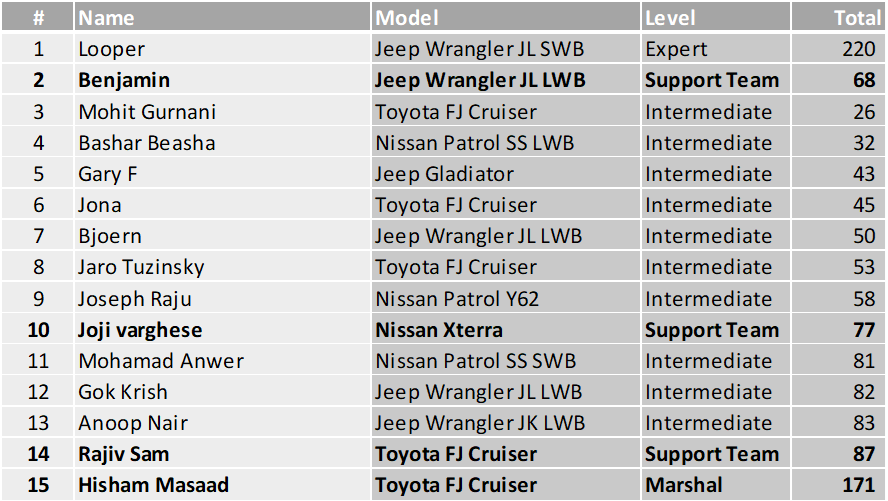
@Bashar Beasha, @Jaro Tuzinsky, @Jona, @Benjamin, @Mohamad Anwer, @Joseph Raju, @Mohit Gurnani, @Joji varghese, @Gary F, @Rajiv Sam, @Anoop Nair, @Gok Krish, @Bjoern cc: @Hisham Masaad I will be posting the convoy order in the afternoon. Request you all to check your calendars and exit if you have any other plans late in the day or tomorrow so that you don't have to leave the drive after the convoy order is prepared or be a no-show. Thank you5 points
-
untilDrive Details Level: Intermediate and above Meeting time: 6:00 AM Meeting Point: https://maps.app.goo.gl/bcxtP2QijZkMuSL89?g_st=ic Type of Car: 5 Jeeps (1 WK Cherokee + 4 Wranglers) What to bring along: Loads of water, snacks, smiles, enthusiasm and willingness to learn. Approximate finish time: 11:00 AM MUST READ Drive Plan #3 Bowls Galore - G Bowl, 4x4 Bowl, Hari Bowl, 360 Bowl: (planned) #2 Sweihan to Al Ain Airport Endurance Test (Plan 28-Oct) #1 Technical Backdoor to Nagra then Express Highway to Exit (Done 22-Oct) @Santoso Marjuki @Naveen Raj @Anoop Nair @mainpasir3 points
-
Good Morning Desert Wanders @Ishak @Pascal and @Zulfikhar Naiyar really looking forward to the drive tomorrow in this beautiful part of the Abu Dhabi desert. We will sort the convoy order out in the morning and throw in a few twists and turns since we have a small convoy. We will be using Radio Ch4 - 446081. Look forward to seeing you all bright and breezy tomorrow morning3 points
-
3 points
-
Sounds good @Looper I’m prepped for tomorrow!2 points
-
Or Extreme Phoenix Team✌️2 points
-
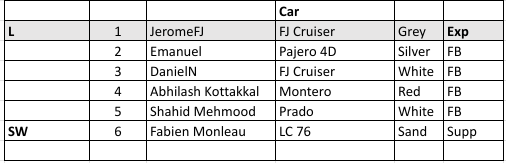
Dear Desert Drivers @Emanuel @DanielN @Abhilash Kottakkal @Shahid Mehmood @Fabien Monleau Thank you for signing up for the drive tomorrow. We will be a small convoy, and it will give us flexibility to adjust the level and the itinerary for maximum enjoyment. Meeting time is 06:30 am The meeting point is https://goo.gl/maps/xJ4Nzi7tNNkxNWXE7 The convoy order will be We will use Carnity Radio Channel 4. Enjoy the rest of the afternoon, and the evening, take a good rest, and see you tomorrow morning! NB: If you meet some IM drivers ( @Looper's drive) on the road or at the fuel station, don't follow them to the end. They start also from Nahel, but from a different location.
 2 points
 -
trying to rope in a couple of absolute newbies to joing this drive @Srikumar hopefully we will all join tomorrow 👍2 points
-
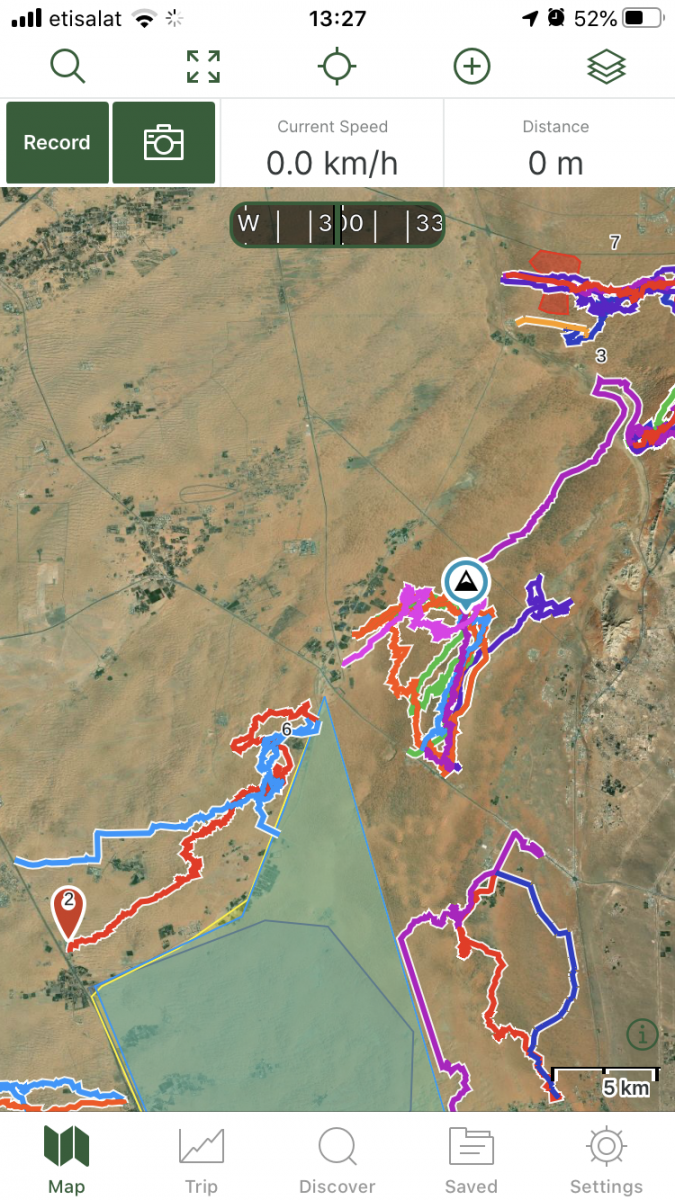
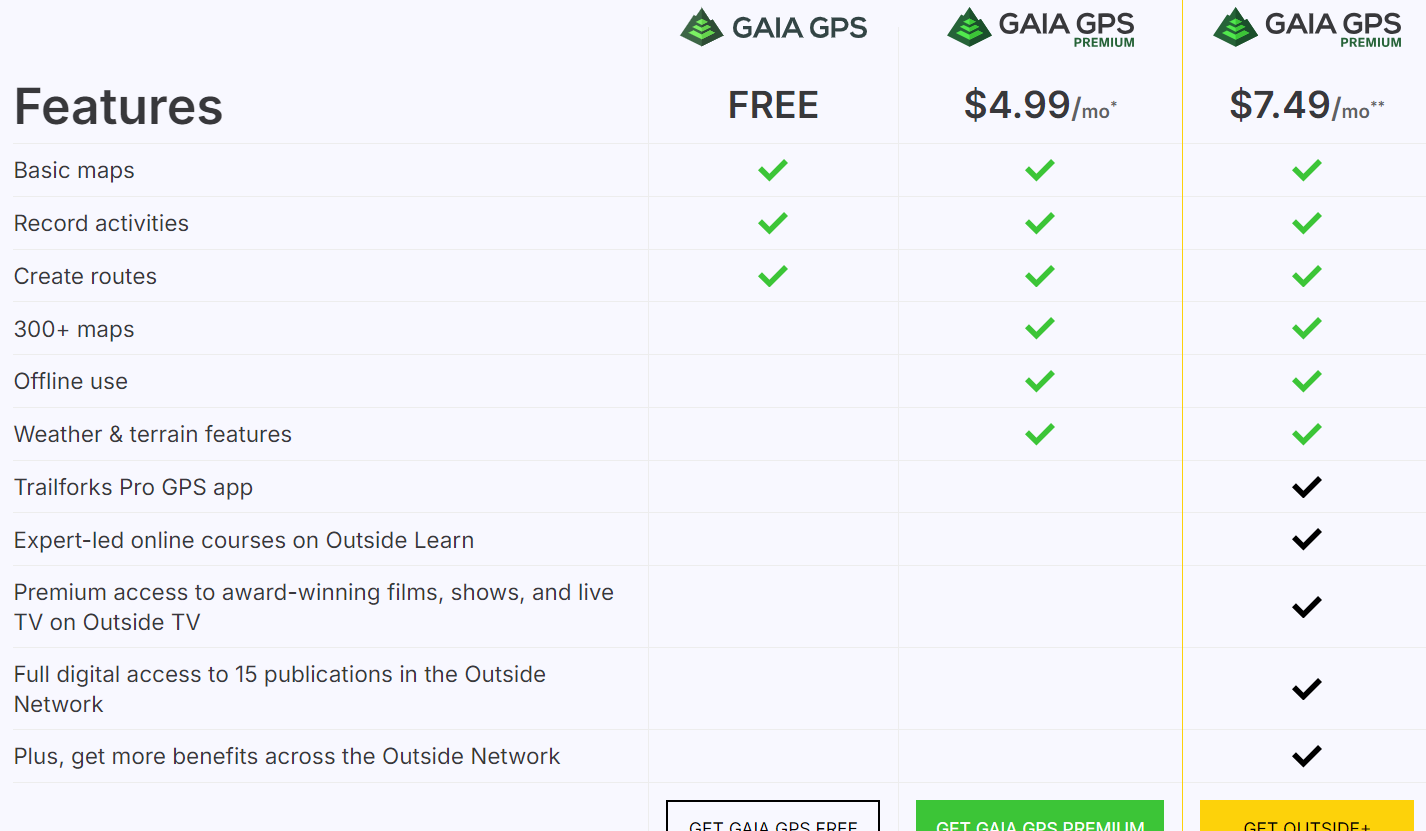
For many offroaders, navigation looks like a scary thing, and finding your way in the desert used to be a daunting task with old obsolete maps, navigation with sun or stars, and many other old tricks of crossing the deserts. Until 5-6 years ago, companies like TomTom and Garmin were ruling the world navigation software and hardware, until our phones became smarter and smarter, and nowadays there are tons of free or paid navigation software programs available which are tailored for hiking, off-roading, cycling, or other outdoor activities where you would like to record your tracks. In this post i will give some basic essential advice on how to get started with navigating by using GaiaGPS, which is an amazing app that allows you to: 1) Create routes at home via your desktop/tablet through the GaiaGPS website. 2) Use different types of maps like topographic maps, sattelite maps, to find your perfect route you'd like to explore. 3) Save and manage all your tracks, waypoints, areas. 4) Automatically sync all this data with the GaiaGPS Mobile App that is being used to record your track or follow the route you have created beforehand. 1) Registering for GaiaGPS account https://www.gaiagps.com/membership/ You can choose for a FREE account, which works fine for basic topographic and satellite maps, but will not allow to use them offline. The PREMIUM membership is recommended for around 60USD per year. The Outside+ subscription is useless as this is mostly for US based customers. Their Trailforks Pro App is very similar to Wikiloc. Once you have become a member, you can head over to Gaiagps.com, login with your account name, and have a look at the basic functionalities. I've posted a short video below that gives a small demo on how to use the GaiaGPS website functionalities. As you can see in the screen, there are many tracks i've recorded with my phone that remain saved in the website. You can remove these or hide them. The red zones i have marked are called "areas" where you can identify tricky areas that you would like to avoid. They will appear on your phone app as well so you can easily avoid them. Waypoints Waypoint, or pins, could be points of interest, landmarks, entry and exit points, or any place where you want to mark the location and save for later reference. They will appear as a "pin" on your map. You can assign a color to them as you like. This might be useful as you can categorize them. Next to the classic PIN icon, you can choose different other ones, like fences, skulls, forest, or anything that will help you in identifying the waypoint. Satellite Images Having crisp detail in the satellite images you are looking, is essential so you can create a route which focuses on the nice bigger dunes instead of the small technical or bushy areas. Gaia comes standard with the Mapbox "Sattelite with Labels" Imagery which is not bad, but the best one i have found so far is the ESRI Sattelite Imagery Map. Below you will find some information on how to add custom maps. The map called "WORLD IMAGERY" in the Premium version is the same as the ESRI Sattelite Imagery Map. Which phone ? Gaia GPS will work on any smartphone that has a decent GPS antenna built-in. In my case i purchased a separate dedicated Android phone which is mounted in my car that i solely use for navigation. This allows me to keep using my own phone as backup device. That dedicated phone has the offline maps downloaded on it, so i don't need cellphone coverage (no sim card). App functionality On an Iphone, this is how the app looks like. The buttons like "RECORD" and "PICTURE" are customizable, and by keeping your finger on it you can select something else you would like to see on the home page. The Magnifying Glass allows you to enter coordinates. You can copy them from within Google Maps. this button toggles between full screen or normal screen. The crosshair button is very important. Click on it once and it will appear green and bring you to your live location and follow you while keeping NORTH up. Click on it again and another logo appears, looking like two reversed triangles. This is the mode that keeps your live location but constantly rotates the map based on your direction. You can experiment with both modes to see what suits you best. I like to stick to the first mode because it allows me to see in which compass direction i am heading. The + Button contains all your other useful functionalities, like adding a waypoint, creating a route, download an offline map, or create an area. Once you hit the record button, the app will start recording your track. Once you finish, click again on it and select "Finish Track" It will then be saved. (and also appear on your GaiaGPS website once you have synced). On the bottom, you can see your trip details, open the list of saved tracks, or go to your settings. Note: In the settings you can put your units/distances in miles or kilometers (whatever you prefer). You can also enable or disable the autosync function, but better to keep it on. So as soon as you have Wifi/Internet on your phone it will automatically sync your tracks between the app and your GaiaGPS account (website). These things will take a bit of practice, and i can recommend you use your Gaia mobile app for a while on your daily commute and experiment a bit with the settings until you have tailored it to your own needs. Exporting Maps Most navigation software use .gpx or .kml files which you can import in Google Earth / Maps or any other navigation program. On the GaiaGPS website, and also on the app you can choose to "export" your track. It will create a .GPX file that you can share with fellow offroaders or import in the Relive app Adding Custom Maps Adding a TMS Map Source – Gaia GPS for the GaiaGps app users, the Google Maps like Satellite, Terrain, or Hybrid, are not standard built in, but can easily be added by using the GaiaGps website. This is the procedure to add for example Google Terrain. 1) While logged into Gaiagps.com, add a custom map source via TMS here: https://www.gaiagps.com/mapsource/add/ 2) Fill in this TMS URL to get Google Terrain: https://mt0.google.com/vt/lyrs=p&hl=en&x={x}&y={y}&z={z}&s=Ga 3) Give it the name "Google Terrain" 4) Set the Min and Max Zoom level on 4 and 19. 5) Click on "Add this Map Source" The next time you will login it will appear in your mobile app. Some other map links. To add them, follow the same steps as above: Google Maps: https://mt1.google.com/vt/lyrs=r&x={x}&y={y}&z={z} Google Satellite:https://www.google.cn/maps/vt?lyrs=s@189&gl=cn&x={x}&y={y}&z={z} Google Satellite Hybrid:https://mt1.google.com/vt/lyrs=y&x={x}&y={y}&z={z} Google Terrain:https://mt1.google.com/vt/lyrs=t&x={x}&y={y}&z={z} Google Roads:https://mt1.google.com/vt/lyrs=h&x={x}&y={y}&z={z} ESRI Sattelite Imagery:https://server.arcgisonline.com/ArcGIS/rest/services/World_Imagery/MapServer/tile/{z}/{y}/{x} Open Topo Maps: https://a.tile.opentopomap.org/{Z}/{X}/{Y}.png Others can be found here: Folder: / (arcgisonline.com) 15 Free Satellite Imagery Data Sources - GIS Geography


 1 point
 -
Looking forward to the drive tomorrow 😀1 point
-
Hi My vehicle doesn’t have ABS kill switch installed yet. Will this be an issue ?1 point
-
thanks @Bjoern I too dropped it... see u tomorrow...1 point
-
@Islam Soliman Thank you Islam for adding me to the drive. I will be there inshallah.1 point
-
Happy to meet you at the drive. Will need to skip camping though. Sorry @Gok Krish1 point
-
Need help to split into 2? 😅1 point
-
This is a long convoy, we will face the issues that come with long convoys. There is a Fewbie drive led by @JeromeFJ in the same area at the same time in case anyone is interested.1 point
-
Likewise 😃 Happy and planning to camp ⛺️1 point
-
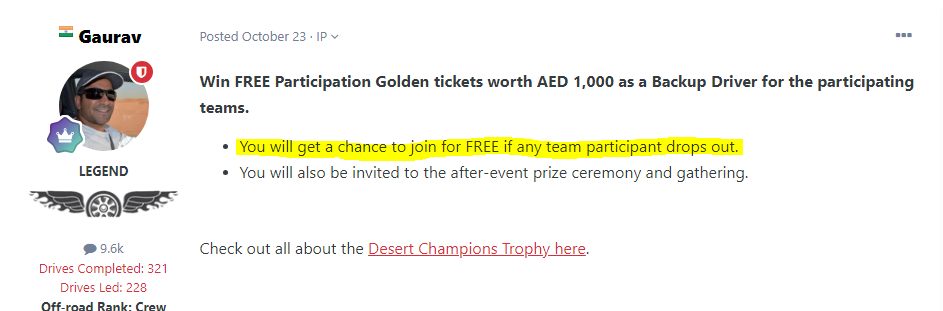
Yes, you've won a free entry ticket as a backup driver for Desert Champions Trophy 2023.1 point
-
@Gaurav So I got a free entry ticket ?1 point
-
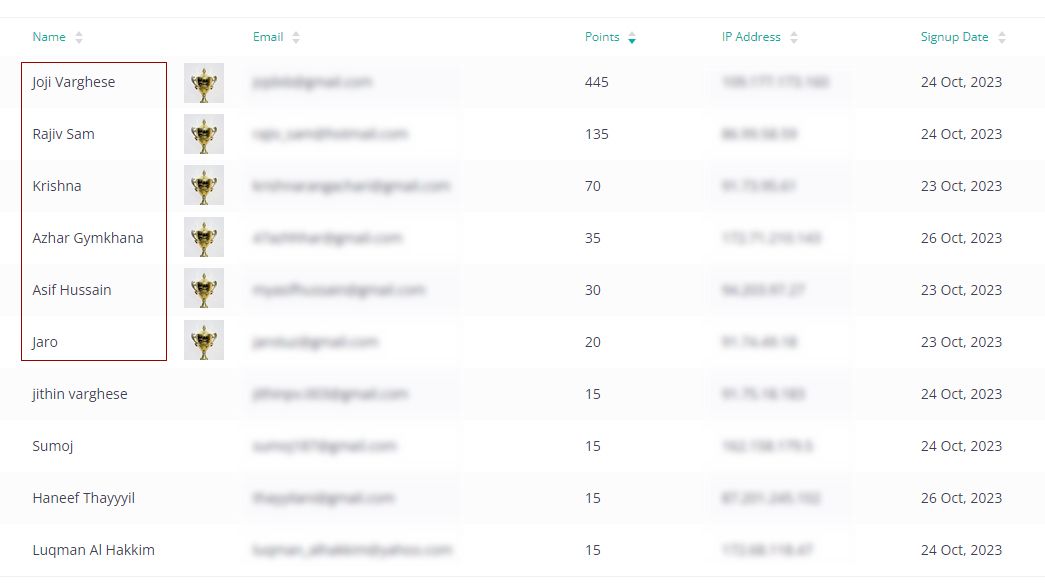
Congratulations @Joji varghese @Rajiv Sam @Krishna R Azhar Gymkhana @Asif Hussain and @Jaro Tuzinsky for coming in TOP 6 out of all contest participants. Which means you've unlocked the GOLDEN TICKET as a backup driver. Please fill in your details through the participation form: Participant Registration Form And Get READY....!
 1 point
 -
The Desert Champions Trophy has finally arrived and waiting to find a new home....!
 1 point
 -
Welcome "Team Strong Hook" from Strong Hook Workshop to the Desert Champions Trophy - 2023! We are thrilled to welcome your team to this year's challenge, and we look forward to an exciting and spirited event. Team Lead: Wissam Torbay @Wissam Participants: Farhat Sahetdurdyyev Cesar Chacon @Cesar Chacon Alberto @Albertorres Miguel Gallego @Miguel Gallego
 1 point
 -
Welcome "Team Icon" from Icon Auto Garage to the Desert Champions Trophy - 2023! We are thrilled to welcome your team to this year's challenge, and we look forward to an exciting and spirited event. Team Lead: Said Al Akraby @Icon Auto Participants: Stuwart Fernandes @stuwart fernandes Abu Fathi @Moh Qar Thomas Eibu @eibuthomas Fadi @fadijoin
 1 point
 -
Thank you for all of you that managed to join us for this amazing drive, under the lead of the one & only Ale. @Ale Vallecchi you have got that something that makes your drives special; i enjoyed every minute of this adventure, which ended up a bit later than planned. I also enjoyed the radio-silence when we were navigating the difficult patches in the desert; we all agreed that summer is still out there, and it only makes the sand even more soft and difficult to drive. @Mohamad Anwer thank you for your 2nd lead - with your SWB, you showed us the way so as not to get stuck. and it is great to re-connect after couple of months. @Fabien Monleau you took control of the Center and was always the first one out of your vehicle to help others; i hope that you managed to get a warranty for your damaged tyre. @Naim Aoun @Charbel @Bjoern you were up to the challenge - couple of refusals that always make us enjoy the sand a bit more every weekend. @Pacific thank you for sweeping us; i preferred to stay in front of you as i was still testing my new air-filter and did not want to take any chances. and finally our dear Marshal @Islam Soliman i hope that you have managed to get your car checked and fixed; fortunately your car started acting up 15 minutes before the exit (when we all quite exhausted from the heat). Enjoy your week chaps until next time @Rk ram special mention to you too mate - aside 1-2 stucks, you were amazing during the drive1 point
-
Absolutely Fantastic efforts put together by @Frederic, this is real gold mine for many offroaders here. Especially to our new leaders in making, please invest some time and get familiar with this app, as MotionX (my fav) is slowly fading off and on the verge of getting discontinued. @sertac @Chaitanya D @Kalahari @Tbone @Brette @Vanessa8580 start using this app and start getting familiar, as from second leaders lead drive you will be required to do planning and leading with navigation app or stand alone satnav (if you prefer). Feel free to post your questions here, so that everyone can learn together.1 point










This leaderboard is set to Dubai/GMT+04:00