
Leaderboard


Popular Content
Showing content with the highest reputation on 09/16/2022 in all areas
-
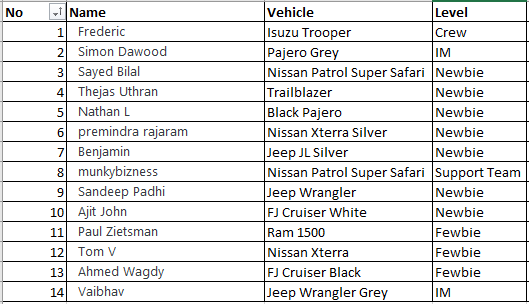
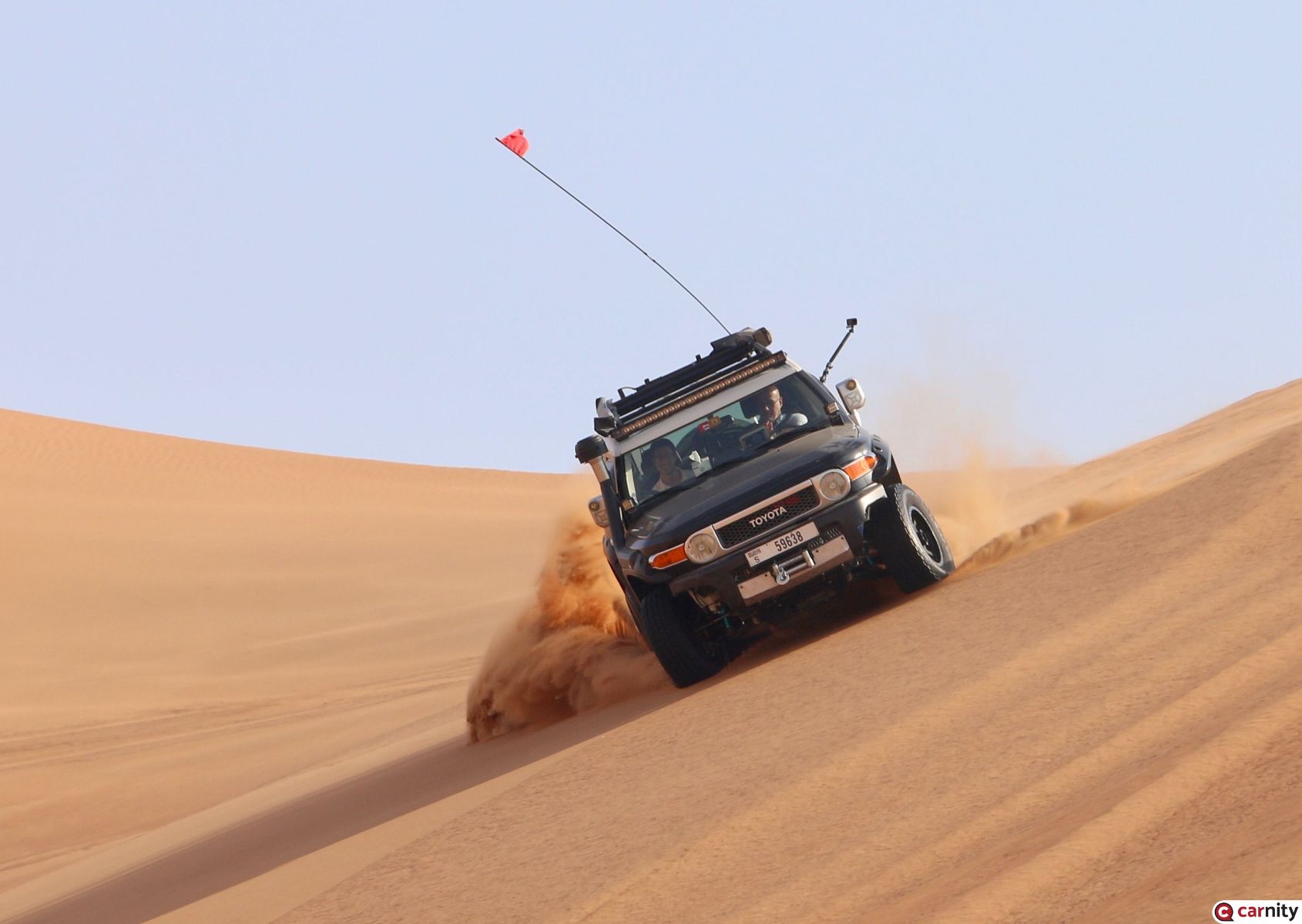
DRIVE RSVP IS NOW CLOSED Carnity Channel 1: 446.006 Mhz Dear Carnitees, @Simon Dawood@Sayed Bilal@Thejas Uthran@Nathan L@premindra rajaram@Benjamin@munkybizness@Sandeep Padhi@Ajit John@Paul Zietsman@Tom V@Ahmed Wagdy@Vaibhav I am looking forward to meeting you all tomorrow morning ! If you need a fuel top-up, there is a small ADNOC nearby the meeting point. (300m further down the road). Please make sure to bring your offroad tools (radio, shovel, offroad flag, compressor)
 8 points
 -
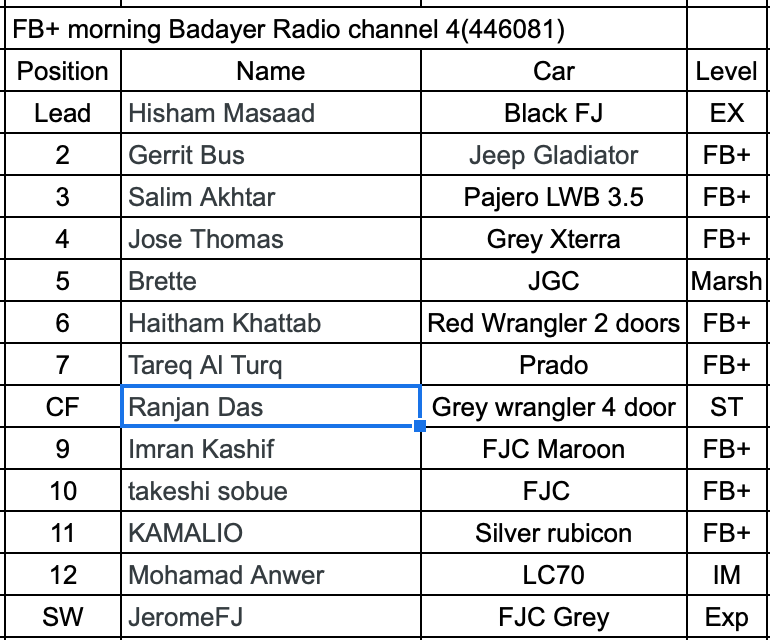
Dear friends. @Gerrit Bus @Salim Akhtar @Jose Thomas @Brette @Haitham Khattab @Tareq Al Turq @Ranjan Das @Imran Kashif @takeshi sobue @KAMALIO @Mohamad Anwer @JeromeFJ Hope you had a good week, and wish you a nice weekend. We will be moving tomorrow as per the below convoy order, using channel 4 on the radio. And I can be reached on 0506318834. Relax and sleep well, and see you tomorrow 5:45am. Good night.
 7 points
 -
Dear Desertnauts fresh off the plane, let's plan tomorrow's trip. First thing, the meeting point has been set at Faqa's sabkha, reachable by taking the exit just before that of the actual Faqa Town. Please note that the meeting time will be 7AM, and that we'll try to start as close to the meeting time as possible (so try to reach a little earlier. The drive plans to drive in a northerly direction, across the slip-faces, hence we may have to drive with a little more patience, to find the right places where to criss-cross the soft slopes and ridges. Initially we'll find more ling range dunes, which will leave room to more technical terrain, made more unpredictable by a bit of vegetation. Once arrived at Murqaab, depending on the time we'll have taken, we may either continue north, across a more technical area, toward the sabkhas just west of Margham, on the way to Lisaili's long range dunes, or we may take a shortcut on the "highway to Solar Park", and reach Lisaili plateau through this shorter route. The convoy will line up as follows: @Alexanderrr in Second Lead @Zulfikhar Naiyar at #3 @Paolo Pellegrini #4 @Jessica Lambert at #5 @Ignacio Quindós will be #6 @Ivan P #7 @Vanessa8580 will Center the convoy @Miguel Codes at #9 @Pierre de Maigret #10 @Zubair at #11 @Gurcharan Mehta #12, and @Rob S in Sweep. The convoy has been built to alternate Fewbies, with Fewbie Plus's or above, so that each lower ranked driver will be following the lines of more experienced driver, The presence of another Marshal (thanks to @Vanessa8580) makes the convoy even stronger and safer. The Carnity Radio Channel chosen for tomorrow will be #3 (446056). Looking forward to seeing you all tomorrow. Enjoy the evening.6 points
-
Dear Dune Surfers! @Jaro Tuzinsky @Emanuel @Gok Krish @TT_Dubai @Ashutosh Garg @Jad Moussalli @Brett Eicher @Senthil Kumar @Murtaza Bhuria @Batuhan Kulac @Zubair Thanks for signing up for what is going to be a real challenging drive! and lots of fun! Please let us know if there are any change in plans as we still have Zubair in waitlist. Our aim is to combine the elements of the previous skill drive series and apply that to navigate the most difficult ( for many off-roaders) aspect of dune surfing-- The technical dunes!! We would enter the dunes just off the Lisaili camel track and pass through some long range dunes , eventually navigating through the technical patches.. This is going to be a slow moving drive with little / no opportunities of long climbs, ridge riding as we would be focusing of using as less engine power and rely on Momentum and driving lines. Driver fatigue is a common occurrence in such drives and hence we will be going in/out of the drive objective areas to relax and free up.. Please come well rested and plenty of water! @Looper @Davie Chase thanks for signing up.!!! Convoy order will be announced during briefing. I will see you all at 5.30 am..6 points
-
Dear Sand Sailors I am busy with some engagement tomo, so sharing the drive details a bit in advance. Its good to see that we have had no drop outs from the original confirmed drivers as yet. I hope it remains like that - in case some minor changes we will adjust the convoy at meeting point. We still have 6 WL, so in case someone's plan changes, please update on the forum at the earliest - so as to ensure the next in line has time to plan for the drive. Meeting Point : https://goo.gl/maps/JkhE9hDwve8mkkU99 Meeting Time : 5:30am Channel : 3 Convoy Order : We will be following the Platoon concept - dividing the convoy into small platoons supporting each other with refusals, stucks etc. While all are expected to self recover and manage, just for those tricky moment, each platoon will be headed by a platoon leader. In case of any emergency, feel free to contact me at +971 50 4430 882. 1. Varun in Grey Wrangler 2. @Morshedi in Yellow Wrangler will be SL, Intermediate or FB + your position is fix. 3. @Ahmad Shaker in his FJ 4. @Zixuan Huang - Charlie will be our 1st Platoon Leader. 5. @Fabien Monleau 6. @Imteeaz 7. @Looper will be our 2nd Platoon leader as well as CF. 8. @ASAD. and his white prado will be at 8. 9. @DP1011 , Deepak wrangler 10 @Waqas Parvez in our second prado of convoy will be our 3rd Platoon leader. 11 @Vaibhav 12. @Anoop Nair wrangler 13. @MMansoor will be the sweep and 4th platoon leader Now convoy is all set for Pardo and Wrangler friendship 😀 WL ORDER Waitlist @Daniel Rodas @Daniel Yang : @Gok Krish Cheers5 points
-
How to report a minor accident in Dubai Firstly, it is important to carry your driving licence, car registration and insurance details with you. If you don't have it, you may have to visit the police station. For minor incidents where no one is injured, stay calm and move the vehicles to the side of the road if it is safe to do so. If the other driver flees the scene, take down the vehicle's make, model and number plate and alert Dubai Police. Motorists can report a minor accident in Dubai via the Dubai Police mobile app or DubaiNow App. Select the 'report traffic accident' service on the homepage of the apps. Select the number of vehicles involved in the accident. Scan the vehicle plate number and add as many details as possible such as the vehicle plate number and licence. Take a picture of the damaged area of the vehicle through the app. Select who is responsible for the accident, including personal details like their contact number and email. If the drivers involved cannot agree who is to blame, they must call Dubai Police on 999. The police will then determine the liable party. Alternatively, all parties should go to the nearest police station to report the incident. The party found liable will have to pay a fine of Dh520. Also, there are certain ENOC petrol stations where motorists can report an accident in Dubai. These are Al Rasheed Street in Al Mizher, Al Khail Road near exit 44, Arabian Ranches and Al Khail Road near Al Barsha police station. What if additional parties are not involved? Motorists must report an accident in Dubai even if they hit an object as opposed to another car. They can use the above method to lodge an incident via one of the apps or call Dubai Police to get a damage report to submit to their insurance company. How to report a minor accident in Abu Dhabi and the Northern Emirates (option 1). Motorists in Abu Dhabi, Sharjah, Ajman, Ras Al Khaimah, Umm Al Quawain and Fujairah can use the Ministry of Interior’s smartphone application (MOI UAE) to report an accident. This service is free of charge. They need to register on the app using UAE Pass or with their Emirates ID. After login, the system will confirm the location of the accident through geographical mapping. Enter the vehicles’ details and attach pictures of the damage. Once you submit the accident report, you will receive a confirmation report from the app. The report can then be used for any insurance claim for repair work. Motorists can use the app to issue an accident report against an unknown person for Dh400. The service fee in Sharjah is Dh335, as per the Ministry of Interior website. How to report a minor accident in Sharjah (option 2) Motorists involved in accidents in Sharjah can also register incidents through the Rafid app. After signing up with a phone number the motorist can report a minor accident by using the app to detail the location with vehicle information and pictures of the damage. The fee is Dh400. The motorist can also get a damage report against an unknown party following an accident. For instance, if their vehicle is damaged while parked. The fee is Dh335. For enquiries call Rafid at 80072343. In the event of a major accident it is still important to dial 999.5 points
-
Very sincere congratulations Hisham @Hisham Masaad. You have always been source of inspiration !
 4 points
 -
Congrats @DP1011 , Deepak wrangler4 points
-
Congratulations @DP1011 , Deepak wrangler, Deepak. Enjoy the mad rush of this penultimate level.4 points
-
We have to thank God we are allowed to have 1 drive per week. 😀4 points
-
👽eagerly waiting for 2 dropouts3 points
-
Congratulations @Rizwanm2 on your well-deserved promotion.3 points
-
Looking forward to another exciting drive, @GauravSoni Thank you for organizing this!3 points
-
General Info This drive is organized in full compliance with the COVID19 guidelines. We expect every member that joins this drive to go through below information and and strictly follow these guidelines in order not to jeopardize someone's health, and to ensure we can keep organizing these drives safely. MUST READ AND TOTALLY AGREE: COVID19 Precautions Mandatory Safety Requirements Ban from Carnity Off-road Club Two Way Radio Guidelines Drive Details Level: Fewbie and Above When: 17 Sep 2022 , Saturday Meeting time: 5.30 AM (SHARP - Without any exceptions). Meeting Point: Dropped pin https://maps.app.goo.gl/whWzd6G66ab8WKZU9?g_st=ic Exit Point: Solar Park - Qudra. Type of Car: Any proper 4x4 with front and back tow hooks and 8-10 inches of ground clearance and Bash Plates What to bring along: Loads of water, snacks (for yourself), smiles, face mask, rubber gloves, enthusiasm and willingness to learn. Approximate finish time: 9.30 AM or early P.S. Only join if you have a compressor to inflate your tires after the drive. LIMITED SPOTS AVAILABLE: Limited to 10 cars only. RSVP will close on Friday - 1 PM. If the RSVP is full and you wish to join, please mention your name on the drive thread to add on the waiting list. Latecomers will be returned back - without ANY EXCEPTIONS. Members without RSVP will be returned back - without ANY EXCEPTIONS. Please withdraw your RSVP, if youaren't joining, so your spot can be taken by others. Repeated no-show members after RSVP will have their account suspended for a month. PLEASE RSVP ON THE BELOW CALENDAR EVENT2 points
-
Thanks for the instructions. Will come prepared2 points
-
Congratulations bro @Rizwanm2👏👏👍2 points
-
Congratulations @Morshedi on your promotion. Well done.2 points
-
Congratulations @Ignacio Quindós on your promotion. well done!2 points
-
Congratulations @Karthik Raptor on your promotion to the Intermediate Level.2 points
-
Congratulations @Mahmoud Taha on your promotion to Fewbie+.2 points
-
@Hisham Masaad will be removing myself from WL. Dont have approval from home ministry for 2 weekend drives so have opted for Sunday 😂. have a safe & enjoyable drive2 points
-
Fred, you have me rather excited with the mention of 2-3 days drives. I wouldnlove to do that.2 points
-
Good morning All ! @Ahmed Wagdy @Sayed Bilal @Tom V@Paul Zietsman@premindra rajaram@Juzer Gandhi@Joji varghese@Thejas Uthran@Benjamin @Nathan L@Ajit John@Gregory @Rajiv Sam@munkybizness First of all i wanted to thank you all for signing on for this drive. On a weekly basis we venture out in the desert for our regular dune-driving activities, but often we forget to stand still for a moment and just enjoy the scenery, take some photos, and interact with each other. The aim for this drive is to focus on these exact things. So please don't expect to be able to do side-sloping or big hill climbing. Bring your camera, bring friends or family, and just enjoy the beauty that Northern UAE has to offer. The landscape is now quickly changing with railroads being built, and a lot of other infrastructural changes. The terrain as we know today might not be there anymore in 10years from now. Expect to see farms, donkeys, cows (if we are lucky), goats, and plenty of camels. The track will lead us to very quiet and remote areas with plenty of vegetation around us. The exact exit point will be either Adhen or Falaj Al Mualla, based on the progress. We will be mostly using existing farm tracks or pylon tracks to navigate through the terrain. Nevertheless we will have some sections in the dunes as well but more limited. As soon as the winter comes, you will see more of these kinds of drives, even extending into full day drives where we make our way into the mountains and even reaching the East Coast. I hope you can appreciate these drives and we can build this further into possible 2-3 day drives (hint... hint....) @Quresh Pajero @Simon Dawood@Sandeep Padhi you guys are currently waitlisted, so keep an eye out towards the end of the week to see if we can get you in. Stay tuned.2 points
-
The last weekend with @Gaurav Soni was amazing! I am looking forward to this one again.2 points
-
Congratulations @Rizwanm2, well deserved👏2 points
-
Well done @DP1011 , Deepak wrangler! We have driven together many times, look forward to seeing you on an intermediate drive soon.2 points
-
Congratulations @DP1011 , Deepak wrangler well deserved Bud Enjoy2 points
-
1 point
-
Congratulations @Imteeaz on your well-deserved promotion.1 point
-
Congratulations @Karthikeyan Govindarajan!!1 point
-
Congratulations @Morshedi well done1 point
-
Congratulations @Karthikeyan Govindarajan on your promotion, Well done!1 point
-
Congratulations @Richard Franks on your promotion. Well done!1 point
-
Congratulations @Prakash Anoop1 point
-
Congratulations @Karthikeyan Govindarajan1 point
-
There is green brand from Australia (club policy I cannot disclose the name) have decent accessories for Hillux, not sure about tow points but tow bar they do have.1 point
-
Congratulations @Ignacio Quindós, enjoy the new level1 point
-
Congratulations @Richard Franks1 point
-
Congratulations @Prakash Anoop 👍1 point
-
Thanks Brette was thinking of going with Cooper for my next change.. especially as not many companies have options with R18 on ATs. This is really good feedback to have1 point
-
@Ahmad Shaker, it will come down to your usage & needs: 1. If your car is a daily driver + you spend all your time in the desert: Yokohama Geolandars G015 is a great tyre. The softer compound makes them a dream to drive on-road and float offroad. You can also use it for some light loose rock driving. Having owned the G015s, I love their on-road performance and their soft pliability in the dunes but now that I'm beginning to venture more into the hills and rocky terrain, I don't trust them there so much. 2. If your car is going to spend an equal or >30% of the offroad time in Wadis and rocky environments, you will need a tyre with a stronger sidewall. The BF Goodrich All Terrain KO2 is a crowd favorite on this front. This tyre is heavier than the Geolandars so if you only do desert driving, you will lose acceleration to better grip. The KO2s are also noisier than the Geos on-road. Yokohama also makes a X-AT (Extreme, All-Terrain) tyre which I'm very keen to review.1 point
-
Congratulations @Sam K enjoy the new level1 point
-
Thank you everyone 🤗1 point
-
Congrats @Sam K ! Enjoy ur new level 😎 !1 point
-
Congratulations @Karthik Raptor! Look forward to driving again when you are back!1 point
-
Congratulations @DP1011 , Deepak wrangler well deserved on your new level,enjoy1 point
-
Congratulations @DP1011 , Deepak wrangler, well deserved 🎉🎉🎉🎉1 point
-
Congratulations @DP1011 , Deepak wrangleron the promotion. Good to see another Jeeper in the intermediate ranks.1 point
-
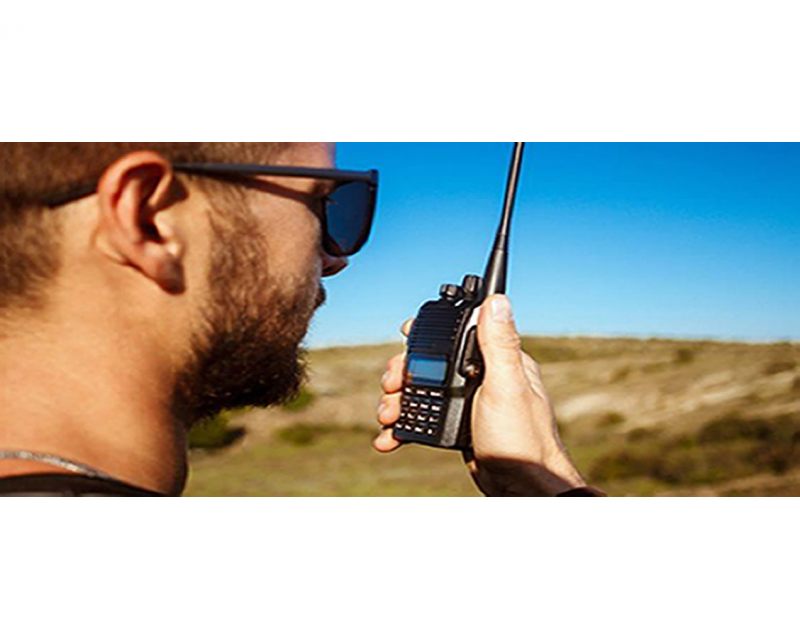 Two-Way Radio Guidelines A two-way radio is an essential safety device during every Carnity Offroad Club drive. It is the primary means of communication between the convoy members. Before the Drive Every participant must bring their own two-way radio. We highly recommend programming your radio with the Carnity frequencies listed below beforehand. We do not provide spare radios or program radios at the meeting point. For your very first club drive we can lend you a radio for that day only. Ensure your battery is fully charged before every drive. No radio = No drive. If you need help choosing, programming or operating your radio, simply create a topic on the Carnity website. Our community will gladly assist you. Radio Channels Carnity Offroad Club uses multiple radio channels so that several convoys can operate simultaneously without interfering with one another. Your Drive Lead will always announce the channel to use before the convoy starts. Recommended Radio Models and Brands UHF Two-Way Radio (400-470Mhz operating range). (VHF will not work). Handheld radio (built-in models can be purchased as extra but you need at least one handheld model. Recommended brands are: Baofeng (UV5R, UV5RH, UV5R Mini), Crony or Motorola MT777, TYT, Make sure it's equipped with a keypad so you can enter the frequency. Do not buy the models without keypad unless you are savvy enough to program with a separate USB cable and Chirp Software. Recommended Radio Settings For best compatibility with other convoy members, we recommend: Frequency Step: 6.25 kHz CTCSS / DCS: Disabled (unless instructed otherwise) VOX: Off Radio Etiquette Listen before transmitting. Keep messages short and clear. Do not interrupt emergency communications. Use the radio for convoy-related communication only. Follow the instructions of the Drive Lead and Marshals. The 10 radio frequencies are listed below: Technical Details STEP FREQUENCY: on the FM band, frequencies are spaced from each-other at a certain bandwidth. The Step frequency is basically the incremental change in your radio when you turn the rotary knob on top of your radio. When you program the radio to a certain frequency, you will need to make sure the appropriate step frequency has been set correctly. (see on the above frequency list). PTT: Short for PUSH-TO-TALK: This is the button on the side of your radio that you push when you want to broadcast a message. MON: Most radios have a Monitor button. When pushed you are basically monitoring the channel. If no-one is broadcasting you will just hear noise. But this is useful to set your desired volume. SQL or Squelch: To make sure that your radio does not pickup every little signal, the squelch acts as a gatekeeper to only allow a broadcast on your radio when it is strong enough or nearby enough. If you encounter a lot of noise that's being picked up by the radio, try changing the SQL setting a little bit. A higher setting makes the radio less sensitive to noise. RX and TX frequencies: RX stands for Receiving frequency, which TX stands for transmitting frequency. in Carnity we transmit and receive on the same channels. DCS / CT codes: These are basically encryption settings that allow a user to make sure only radios with exact same CT codes can listen in on the chatter. As these settings are confusing and complex, they should not be used (CT should not be showing on your display). Programming the Motorola/Crony MT777: Note: This radio has 2 operating modes called "Frequency" and "Channel". To switch between these modes, keep the ENTER button pressed while switching on the radio. Pressing the VFO/MR button while you're in Frequency mode will bring you to the combined mode, which is basically a screen that shows both the channel and the frequency. You can use either one of these modes during operation. To Program the Channels: 1. Make sure your radio is switched off. 2. Press the Moni (black button on top of the orange one on your left side), and MENU key together while switching on the radio. 3. Wait for the set to display SELF (which means manual setup). 4. Press Enter and it will show the Channel number. 5. You can choose which channel to program by selecting it from the rotary selector knob on the top of your device. 6. Once you have the desired channel, press ENTER. 7. Type your first frequency you want to program. 8. Press ENTER on every setting below to go through the advanced settings and verify if they are programmed as following: (If above settings are not correct they can be changed with the rotary knob on the top keep pressing enter until your set displays the next channel to be set). 03=OFF (if a number is showing here, push the *Lock button until OFF appears). 04= Enter the same frequency as the one you want to program. 05= OFF (if a number is showing here, push the *Lock button until OFF appears). 06= OFF 07= ADD 08= HIGH(H) 09= NARROW 10=-------- 9. Repeat from Step 5 to program the rest of your channels. Very useful Youtube video below: method for adding a single frequency later on, without going through the whole SELF programming mode again: 1. Make sure the radio is in Frequency Mode. Type in the frequency you want to program. E.g 446.00625 2. Press MENU and then press the VFO/MR button. The channel number will start to blink. 3. Use the rotary selector knob to select on which channel you want to save this frequency. 4. Press VFO/MR button again to confirm and exit. Keypad can be locked by pushing the * LOCK button for a few seconds. --------------------------------------------------------------------------------------------------------------------------------------------------- Programming the Crony CN888: Note: This radio has 3 operating modes called "Frequency", "VFO", and "Channel". You can toggle between these modes by pressing the orange Function button on the top left corner, followed by pressing 1 (Mode). Programming the radio as described below can only be done in VFO mode. 1. Switch on the radio. 2. Press the Function Key (orange button on top left corner). 3. Press 4 (STEP) until it shows 6.25. Press EXIT to confirm. 4. Now type the first frequency you want to program. Eg. 446.00625 5. Now press the # button. The Channel number in the corner of the display will start to blink. 6. Select with the A (up) or B(down) buttons to choose wich channel you want to save the frequency. 7. Press the C button. the radio will confirm by saying "SAVED AS RX FREQUENCY" 8. Press the # button again. The Channel number in the corner of the display will start to blink. 9. Press the D button. the radio will confirm by saying "SAVED AS TX FREQUENCY" Keypad can be locked by pushing the Function button, followed by the *F.L button. Programming the Baofeng UV5-R: When buying a radio like the Baofeng UV5R, many certain frequencies and channels are already programmed into the radio, but these are different from the ones we use in Carnity. As you will be programming 5 new channels onto Channel number 1 till 5, it is important to first delete these existing frequencies stored in those channels. You can do that as following: Step 1: Delete the existing channels from channel 1 till 5: 1- Switch on the radio 2- Press the MENU button followed by the buttons 2 and 8. (Menu 28). 3- Press MENU, and then use the UP/DOWN arrows to select which channel you want to clear. 4- Select CH1 and press MENU again, you will hear "delete channel, followed by confirmed". 5- Now go back to step 3 and do the same for the following channels (CH2-CH3-CH4-CH5). 6- Now all 5 channels are clear and ready to be programmed. Step 2: Set the step-frequency: - Switch on the radio - Press the MENU button and with the up and down buttons select STEP frequency. - Change this to 6.25 and press MENU to confirm. - Press EXIT to go back to the main menu. Step 3 Program the new frequencies in the radio: 1- Press the VFO button. You will hear the confirmation “frequency mode”. 2- Make sure the arrow is on the top line. If not, press the blue A/B button. 3- Type in the frequency you want to save. I.e 446.00625 4- Press MENU, followed by button 2 and 7 (menu 27). You will see MEM-CH. 5- Press MENU and now use the up and down buttons to select the channel you want to save it on. 6- Press MENU again to confirm. Your first frequency is now stored under channel 01. (receiving memory). 7- Press MENU TWICE again to confirm. Your first frequency is now stored under channel 01. (transmitting memory). 8- Press EXIT and repeat from step 3 onwards to program your remaining channels. Note: To program the Carnity backup frequency channel 5, you will need to set the step frequency to 12.5. When done, follow the same steps to program and save it under channel 05. You can either program these channels one by one into your radio, which is the easiest for you later on, or you can just enter the frequency without saving it. Some extra notes: Option 5 in your menu should be on Narrowband. Option 10 and 12 in your menu should be set to OFF (we are not using CT codes). BaoFeng_UV-5R_Manual_(1).pdf1 point



.thumb.jpeg.eb6f2648ffc56a6a0e6c35544821f1a1.jpeg)


This leaderboard is set to Dubai/GMT+04:00